Panorama

Every agent you run, on one canvas.

Terminals, notes, code and diffs are tiles you drag, resize and park side by side. The shells run in a native daemon, so closing the window never kills a session.

v0.2.7 Windows, macOS, Linux MIT

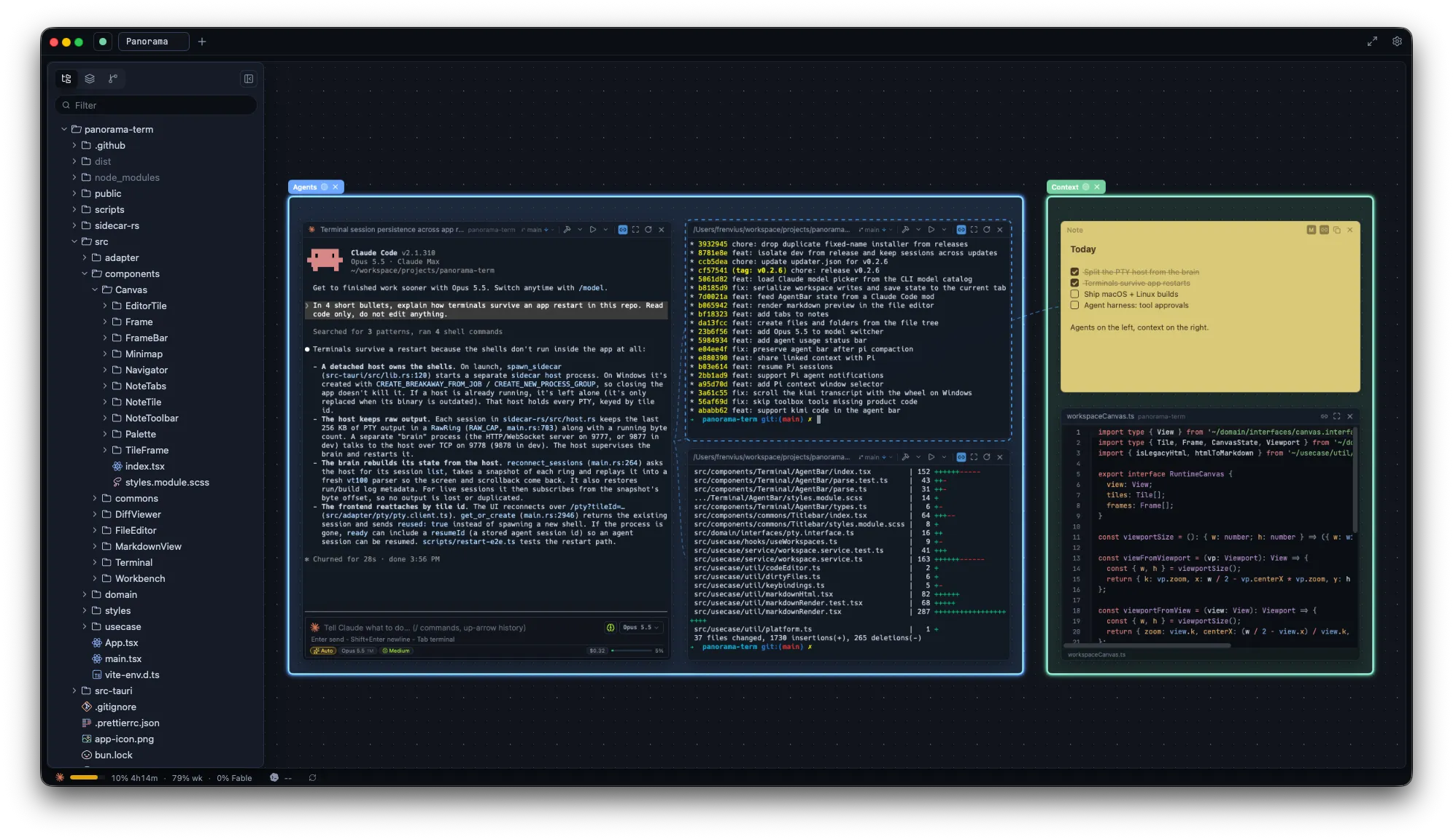
Panorama with a Claude Code agent, a git log and a diff in an Agents frame, next to a note and a code editor in a Context frame
Agents

Watch every agent at once.

Run Claude Code, pi, Codex or any CLI agent in its own tile and keep all of them in view, instead of cycling through tabs to see who is done.

Prompt box

Claude Code tiles get a floating prompt box with image paste, slash commands and a model and effort picker.
Live status

Model, context, cost and usage in the status bar. Busy, waiting or idle at a glance on every tile.

Notifications

A toast when an agent finishes in a tile you are not looking at, even with the window minimized.

Link tiles, and agents can talk.

Draw a link between tiles and it shows up as a cord on the canvas. An agent in a linked terminal can message the agents on the other end and read their screens, so one agent hands work to another. Link a note and it becomes context the agent reads and edits, so plans and checklists stay in sync with the work.

Works with your agent

Built around Claude Code first, through a Panorama mod that runs inside it. Other agents get less depth.

Claude Code
Full integrationPrompt box, model picker, live status, notifications, linked context
pi, Kimi Code
Prompt barPrompt bar and live status
Codex, OpenCode, Antigravity
RecognizedDetected and labeled in their tiles
Any CLI
TerminalRuns as a plain terminal, like anywhere else
Canvas

Spread out. The canvas has no edge.

Lay work out the way you think about it, and find it again tomorrow exactly where you left it.

Infinite canvas

Pan, zoom and spread out as many live terminals as you need. Tiles snap to each other as you drag and resize.

Frames

Group related tiles in a labeled frame and they move together. Agents on the left, context on the right.

Minimap and navigator

Jump back to anything far off screen. Press Shift twice to go straight to a tile by name.

Workspaces and tabs

A separate canvas per project, saved locally and restored exactly as you left it.

Terminals that survive.

Sessions live in a native PTY daemon, not in the window. Close the app, reload the UI or install an update, and every tile reattaches to its running shell with the scrollback intact.

~/projects/api

main
$ bun test --watch
✓ 214 passed (1.82s)
  watching for changes...
── Panorama closed ─────────────────
── Panorama reopened, session reattached ──
✓ 214 passed (0.41s)
  watching for changes...

Keyboard first

  • New terminalModT
  • New noteModShiftN
  • Reopen closed tileModShiftT
  • Fullscreen tileModShiftF
  • Go to tileShiftShift
  • NavigatorModB

Mod is Ctrl on Windows and Linux, Cmd on macOS. Every shortcut is rebindable in Settings.

Context

The rest of the job, next to the agents.

Read what the agent wrote, review the change and commit it without leaving the canvas.

Notes

Markdown sticky notes with checklists and tabs, in a palette of colors.

Code editor

Open any file from the tree in a tile or an overlay, with syntax highlighting, find and Markdown preview.

Git

File tree, branches, staging, commit and history in the sidebar.

Diff viewer

Side-by-side or unified, word-level highlights. Walk changes with Alt+Arrow.

Download Panorama

v0.2.7, free and open source under MIT. Installed builds update themselves.

macOS

Not notarized yet. Right-click the app and choose Open on first launch.

All release filesBuild from source